
All articles
Help Center Sakaba Plus
Accent colors and app icons
Switch between light and dark, add a touch of color, or give Sakaba a different Home Screen icon.
Sakaba is black and white by default. Light and dark mode are free for everyone. With Sakaba Plus you can also add an accent color and choose a different app icon.
All three settings are under Appearance in Settings. Tap the gear at the top left of Home to get there.
Choose light or dark
Tap Theme and choose System, Light or Dark. System follows your iPhone or iPad, so Sakaba switches when your device does.
Pick an accent color
With Plus, tap Accent and choose a color: Monochrome, Forest, Olive, Amber, Cognac, Burgundy or Plum. Monochrome is the default black and white.
Without Plus, the Accent row shows a ✨ Plus badge, and tapping it opens the Sakaba Plus page.
The accent is used sparingly, on the things you act on:
- the selected tab
- the
Start mixingbutton and the round button in guided mixing - the
+buttons that add a recipe or a journal entry - the heart on a recipe you’ve favorited
- the flavor chart on a recipe page
Icons, ratings and the rest of the app stay neutral on purpose, so the color marks what matters. Each accent has its own shades for dark mode and for Increase Contrast, so buttons stay readable either way.
Change the app icon
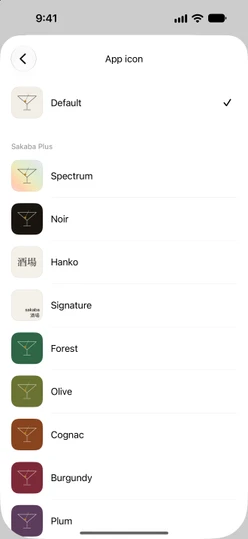
Tap App icon to see the icons. Default is free. With Plus you can also choose Spectrum, Noir, Hanko, Signature, Forest, Olive, Cognac, Burgundy or Plum.
Tap an icon to use it. iOS shows a short alert to confirm the change, and a checkmark marks the icon in use. Without Plus, tapping a Plus icon opens the Sakaba Plus page.
If you see Couldn’t change the icon, iOS didn’t allow the change. Try again in a moment. If it keeps happening, this device doesn’t support alternate icons.
If Plus ends
When Plus ends, the accent goes back to Monochrome and the icon to Default. Sakaba remembers what you had chosen. If Plus comes back, for example when you subscribe again or a billing problem is sorted out, your color and icon return on their own, unless you picked something else in the meantime.
Your theme is free and never changes.
Good to know
- On this device only. Theme, accent and icon are saved on each device separately; they don’t sync through iCloud.
- Get Plus. See Buy Sakaba Plus.
Questions? Write to sakabaapp@proton.me.