
All articles
Help Center Getting started
Welcome to Sakaba
A quick tour of Sakaba: the three tabs, where Favorites, the Journal and Settings live, and what you need to run it.
Sakaba (酒場) is a cocktail app for your home bar: 1,000 classic and modern recipes, a list of what your bottles can make, step-by-step guided mixing and a tasting journal. There’s no account to create. Open it and start pouring.
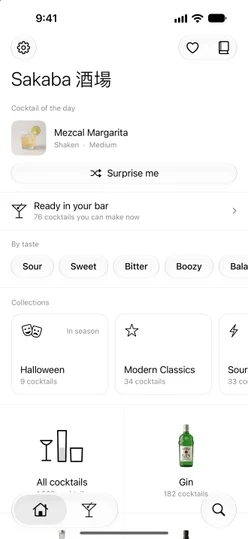
The three tabs
Sakaba has three tabs. On iPhone the tab bar shows icons only.
- Home (the house) is where you browse. It opens with the cocktail of the day, then what your bar can make, drinks by taste, curated collections, and a grid of
All cocktailsand the 15 spirits. Find a cocktail walks through it. - My Bar (the martini glass) has two parts. Under
Ingredientsyou tick the bottles you own; underCocktailsSakaba lists what you can make with them. See Set up My Bar and What can I make. - Search (the magnifying glass at the end of the tab bar) finds drinks by name, ingredient or spirit. See Search tips.
Favorites, the Journal and Settings
These live at the top of the Home tab, not in the tab bar:
- The gear at the top left opens Settings: measurement, language, notifications, appearance, Sakaba Plus, backup, and
About Sakaba. - The heart at the top right opens your Favorites. See Favorites.
- The book next to it opens your Journal, the tasting notes you’ve logged. See Tasting journal.
Each one opens as a sheet over Home. Swipe it down to close it.
Open a recipe
Tap any cocktail to open its recipe as a card that slides up from the bottom. Swipe it down to go back to where you were. At the bottom of the recipe, Start mixing walks you through it step by step (Guided mixing) and Add entry logs it in your journal. Read a recipe explains every section.
Free and Sakaba Plus
Sakaba is free to download. The free version includes 80 recipes from across all 15 spirits, up to 3 recipes of your own and up to 3 journal entries. Recipes that need Sakaba Plus carry a ✨ sparkle; Plus opens the full library and removes the limits. See Free vs. Plus.
What you need
- iPhone or iPad with iOS 18 or later.
- iPhone shows Sakaba in portrait. iPad works in any orientation, and the tab bar shows each tab’s name and can be switched to a sidebar.
- iOS 26 and later show Sakaba with Apple’s Liquid Glass look. On iOS 18 to 25 buttons are simpler capsules and list search fields sit at the top. Every feature works the same on both.
Good to know
- No account, no sign-up. Your recipes, journal, favorites and bar sync between your devices through your own iCloud. See iCloud sync.
- Ten languages. Sakaba follows your device’s language until you pick one in
Settings → Language. See Languages.
Questions? Write to sakabaapp@proton.me.