
All articles
Help Center Making drinks
Read a recipe
What each part of a recipe page shows, from strength and taste to steps, tools and similar drinks, and what you can tap.
Every recipe in Sakaba lives on one page: what the drink is, how strong it is, what goes in and how to make it. Here’s what each part shows, and what you can tap.
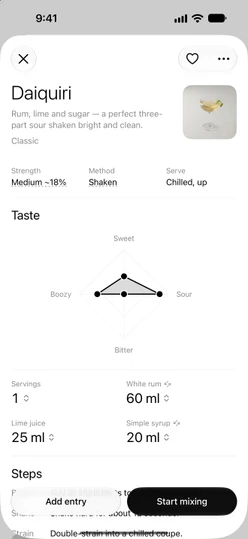
Open a recipe
Tap any cocktail in a list, in Search, or the cocktail of the day on Home. The recipe opens as a sheet; swipe it down or tap ✕ at the top left to close it. From Favorites or the Journal it opens inside that sheet instead; tap the back arrow to return.
Recipes marked ✨ are part of Sakaba Plus. Without Plus, tapping one shows a short Recipe is part of Sakaba Plus sheet instead of the recipe. See What’s free and what’s in Plus.
The top of the page
- Name and summary. In some languages, well-known classics also show their name in the local script, in parentheses. See Languages.
- Origin. When a recipe’s author or origin is known, it appears under the summary.
- Photo. Tap it to view it full screen, then pinch to zoom. Your own recipes without a photo show a drawn glass instead, which doesn’t open.
Strength, Method and Serve
Strengthis Light, Medium or Strong, followed by an estimate of the finished drink’s alcohol by volume, marked with a~. The estimate allows for the water that ice adds while you shake or stir. A drink with no alcohol shows0%.Methodis how it’s made: Shaken, Stirred, Built, Muddled or Blended.Serveis how it reaches the glass, such as Over ice or Chilled, up.
A value with a dotted underline is a defined term. Tap it for a short explanation, then tap Got it. Strength explains ABV, Method explains the technique, and Serve explains On the rocks and Neat. Other serve values, such as Over ice or Chilled, up, are plain text. More in Bar basics.
Taste
A four-point chart of how sweet, sour, bitter and boozy the drink is, from 0 to 5. It reshapes when you change an amount. See Flavor profile.
Servings and ingredients
The grid starts with Servings, then lists each ingredient with its amount in your unit. Tap any of them to change it with a ruler, then tap Set. See Servings and scaling.
Optionalnext to a name means you can leave that ingredient out.- Two small crossed arrows next to a name mean there’s a substitute. Tap the ingredient to see up to two. See Substitutions.
—instead of an amount means you set that ingredient to 0, so it’s left out of the pour.
Steps
Each step shows its label, such as Build, Shake or Garnish, beside the instruction. The garnish is part of the steps. To make the drink one step at a time, tap Start mixing at the bottom. See Guided mixing.
Pairs with
A food suggestion that suits the drink’s taste and base spirit.
You’ll need
The glass and the bar tools the method calls for. A jigger is always there; a shaken drink adds a shaker and a strainer, a stirred one a mixing glass, barspoon and strainer. Tap any item for what it is.
Journal
Once you’ve logged this drink, your latest entries appear here, up to 3, with your average star rating. If there are more, tap See all N entries. To log the drink, tap Add entry at the bottom. See Tasting journal.
Similar
Three drinks with the closest taste profile, favoring different base spirits when several are about as close. Tap one to open it, or touch and hold it for Add to favorites and Open.
The buttons at the top
- Heart. Adds the recipe to your Favorites.
- ↺. Appears once you’ve changed the servings or an amount. Tap it, then
Resetto go back to the original recipe. ⋯. Opens a menu:Buy missing (N)puts the bottles you don’t have on your shopping list. It only appears when something for this drink is missing from your bar and not already on the list.Share recipemakes a picture card. See Share a recipe.Duplicate & editcopies the recipe into a new one of your own. See Create your own recipe.- On your own recipes,
Edit recipeandDelete cocktailas well.
Good to know
- Your changes stay. Servings and amounts you change are kept for that recipe on this device, until you reset them.
- No steps, no mixing.
Start mixingonly appears on recipes that have steps. - Larger text. At accessibility text sizes, the page rearranges itself: the ingredients go to one column and the buttons stack, so nothing gets cut off.
- Copies count.
Duplicate & editcreates a recipe of your own, so on the free tier it counts toward the 3 you can make.
Questions? Write to sakabaapp@proton.me.