
All articles
Help Center Data, privacy & support
Contact support
Report a problem, suggest a recipe or ask a question, from the app or by email.
Sakaba is built by a solo developer, and you can write in about anything: a problem, a question or a recipe you’d like to see. The quickest way to reach support is from inside Sakaba, because it fills in the technical details for you.
Send feedback from the app
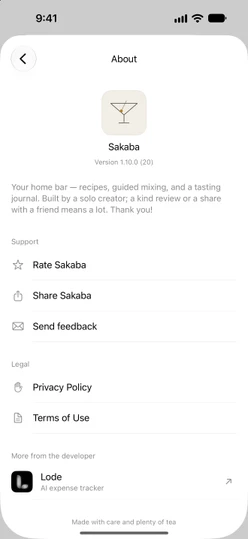
- Tap the gear at the top left of Home to open Settings.
- Tap
About Sakaba. - Under
Support, tapSend feedback.
A new email opens, addressed to support, with the subject “Sakaba — Feedback”. Below a line at the bottom, it already lists:
- the Sakaba version and build, such as 1.10.0 (20)
- your device’s model identifier, such as iPhone17,3, and your iOS version
- your device’s region and language setting, such as en_US
Write your message above the line and send it. You can delete any of those details if you’d rather not share them.
If no email app on your device can open it, Sakaba copies the support address instead and shows Copied support email. Paste it into whichever email app you use.
Write by email
You can also write directly to sakabaapp@proton.me from any device. If you do, mention your Sakaba version (shown under the app name in Settings → About Sakaba), your device and your iOS version.
What to include
The more specific you are, the faster a problem can be fixed:
- What happened, and what you expected instead.
- The steps that lead to it, starting from opening the app.
- Which recipe or screen, by name.
- The exact message, if Sakaba showed one.
- A screenshot or screen recording, if you can.
- Your language, if something looks wrong in a translation.
- For a purchase question, which plan you have and roughly when you bought it. Never send your password or card details; they’re never needed.
Rate or share Sakaba
If you enjoy Sakaba, two other rows in the same Support section help a lot:
Rate Sakabaopens the App Store page where you can rate the app and write a review.Share Sakabasends a link to the app to a friend.
Good to know
- Billing and refunds are handled by Apple, not by Sakaba. See Manage or cancel your subscription.
- Common problems may already have an answer in Troubleshooting.
- Your email stays private. What you send is used only to answer you. See Your privacy.
Questions? Write to sakabaapp@proton.me.