
All articles
Help Center My Bar & shopping
Shopping list
Keep a list of the bottles you want to buy, then move each one into My Bar with a tap once you have it.
The shopping list keeps track of the bottles you want to pick up. It lives in My Bar, and once you’ve bought something, one tap moves it into your bar.
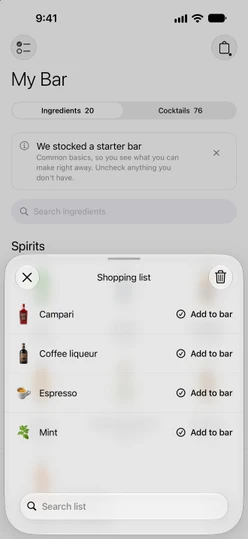
Open the list
Tap the shopping bag at the top right of My Bar. A dot on the bag means there’s something on the list.
Add bottles
There are three ways to put something on the list:
- From a drink you’re close to. On the Cocktails tab in My Bar, rows under
One ingredient awayandTwo ingredients awayhave a bag on the right. Tap it to add what’s missing. The bag fills in once it’s on the list, and a message confirms it:Added to shopping list, orAlready on your shopping listif it was there already. - From Stock up. Under
Stock up to unlock more, tap a bottle’s tile to add it. Tap it again to take it off. - From a recipe. Open the recipe, tap
⋯at the top right and chooseBuy missing. The number in parentheses is how many ingredients it will add. The option only appears when you’re missing something that isn’t on the list yet.
See What can I make for how those sections work.
Mark a bottle as bought
Tap Add to bar next to an item. Sakaba ticks it in My Bar, takes it off the list and confirms with a short message. The Cocktails tab updates straight away.
If you tick an item on the Ingredients tab instead, it comes off the shopping list automatically.
Search or clear the list
Use Search list to find an item in a long list.
To empty the list, tap the trash button (Clear list) at the top right and confirm with Clear list. This only clears the list; nothing is added to your bar.
Good to know
- Removing one item. The list has no delete button for a single item. Tap its tile under Stock up again if it’s there, mark it with
Add to bar, or clear the whole list. - Your language. Items are listed in the app’s language, so the list reads naturally at the store.
- Sync. The shopping list syncs across your devices signed in to the same iCloud account, along with My Bar. See iCloud sync.
- Free for everyone. My Bar and the shopping list don’t need Sakaba Plus.
Questions? Write to sakabaapp@proton.me.