
All articles
Help Center Getting started
Languages
Sakaba speaks 10 languages. Here’s how to switch, what gets translated, and why cocktail names keep their original spelling.
Sakaba is fully translated into 10 languages: the app itself, every recipe and the Bar basics reference. It follows your device’s language until you choose one in Settings.
The 10 languages
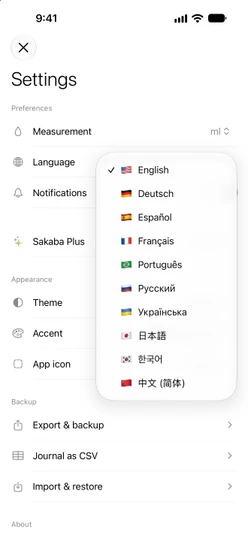
English, Deutsch (German), Español (Spanish), Français (French), Português (Portuguese), Русский (Russian), Українська (Ukrainian), 日本語 (Japanese), 한국어 (Korean) and 中文 (简体) (Simplified Chinese).
Change the language
- On the Home tab, tap the gear at the top left to open Settings.
- Tap the menu next to
Languageand choose a language.
The app switches straight away; there’s nothing to restart. Your choice applies only to Sakaba, not to the rest of your device.
Following your device
Until you pick a language in Sakaba, it uses your device’s language, or a language you set for Sakaba alone in your iPhone’s Settings app. Sakaba takes the first language in your device’s language list that it supports, and English if none match. Traditional Chinese settings get Simplified Chinese.
Once you pick a language in Sakaba, that choice wins, and changing your device’s language no longer changes Sakaba.
What’s translated
- Every screen, button and message.
- All recipe content: descriptions, ingredients, steps, garnishes, glasses, methods, strengths and pairings.
- Units such as “dash” and “sprig”, with the right plural forms.
- The Bar basics glossary, glassware, garnishes and techniques.
- Weekend reminders and the text on the Home Screen widget.
Your own recipes show what you typed. Ingredients you picked from Sakaba’s suggestions while writing them are translated like any catalog ingredient.
Cocktail names
Cocktail names keep their original spelling in every language: a Negroni is a Negroni, and a Vieux Carré stays a Vieux Carré. Some brand names inside recipes also stay as they are, where that’s how people write them in that language.
In Ukrainian, Russian, Japanese, Korean and Chinese, about 180 well-known classics also show their local name, smaller and muted, in parentheses: “Negroni (Негроні)” in Ukrainian, “Negroni (ネグローニ)” in Japanese. Lesser-known drinks keep only the original name, as they would on a bar menu there. On a recipe page, the local name moves to its own line under the title when the two don’t fit side by side.
You can search with either name. With the app in Ukrainian, “негроні” finds the Negroni. See Search tips.
Good to know
- Units don’t change with language. Milliliters or ounces is a separate choice, in
Settings → Measurement. See Units: ml and oz. - Sakaba doesn’t follow your device anymore? A language was chosen in the app at some point; some older installs chose one automatically. Pick the language you want in
Settings → Language. - Siri uses Siri’s own language, not Sakaba’s. Sakaba’s Siri phrases are translated into all 10 languages. See Siri and Shortcuts.
- The widget gallery describes the widget in your device’s language, while the cocktail of the day on the widget uses Sakaba’s.
Questions? Write to sakabaapp@proton.me.