
All articles
Help Center Getting started
Search tips
Find a drink by name, ingredient or spirit, even with a typo or a missing accent, and get the most out of every search box in Sakaba.
Search finds cocktails by what they’re called and by what’s in them, so “lime” or “mezcal” works as well as a name. It forgives typos, missing accents and run-together words, and the same rules apply in every search box in the app.
Search the whole library
Tap the magnifying glass at the end of the tab bar and type in Search cocktails. Results include all 1,000 catalog recipes and your own. Plus recipes appear too, marked with ✨; tapping one without Plus shows the Recipe is part of Sakaba Plus card.
Results are ranked by where your words match, best first:
- The cocktail’s name
- Its base spirit
- Its ingredients
- Its description
Within each, a match at the very start beats a match at the start of a later word, which beats a match inside a word. So typing “rum” lists drinks whose name starts with Rum first, then names with Rum later on, such as Hot Buttered Rum, then drinks filed under Rum, then other drinks that use it.
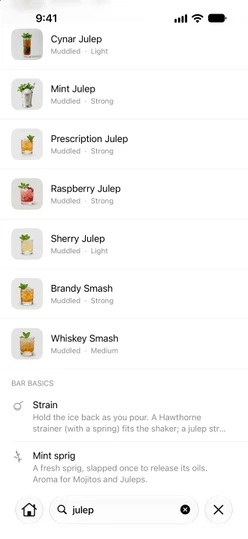
Search with several words
Type more than one word and each word has to match somewhere: in the name, the spirit, an ingredient or the description. “gin lime” finds drinks made with both, such as the Gimlet.
Typos, accents and punctuation
You don’t need to type a name exactly:
- Capitals and accents don’t matter. “pina colada” finds Piña Colada, and “vieux carre” finds Vieux Carré.
- Apostrophes and hyphens are ignored. “tommys” finds Tommy’s Margarita, and “b52” finds B-52.
- Run-together words work. “gintonic” finds Gin & Tonic.
- Small typos are forgiven. “daiquri” finds Daiquiri. Typo matching starts at four letters, and it only kicks in when your search finds fewer than five exact matches, so a good search never gets cluttered with near misses.
Search in your language
If Sakaba is set to another language, you can search ingredients, spirits and descriptions in that language or in English. In Ukrainian, Russian, Japanese, Korean and Chinese, the well-known classics also answer to their local name: with the app in Ukrainian, “негроні” finds Negroni. See Languages.
Recent and suggested drinks
Before you type, Search shows Recent: up to 12 cocktails you’ve opened from Search. A newly opened drink goes to the top; one already in the list keeps its place. To clear them, tap the trash button at the top right, then Clear.
With no recents yet, you’ll see Try one: the cocktail of the day and a few more drinks you can open.
Bar basics in results
Search also looks through Bar basics, the glassware, techniques, garnishes and glossary terms. Up to four matches appear under Bar basics below the cocktails, once you’ve typed at least two letters. Tap one to read its definition.
Other search boxes
Most lists in Sakaba have their own search field (at the bottom on iOS 26 and later, at the top on earlier versions), and they all match the same way:
- Every cocktail list: a spirit,
All cocktails, a taste or a collection. Searching there ranks results by match, not by the list’s sort order. - My Bar’s ingredients, and your shopping list.
- Your Favorites and your Journal.
- Each Bar basics sheet.
Good to know
- No matches? Search says
No matches. Try fewer words, or search for an ingredient instead of a name. - On iOS 27, tapping the Search tab puts the cursor in the search field right away.
- Spotlight. You can also find Sakaba recipes from your iPhone’s own search. See Siri and Shortcuts.
Questions? Write to sakabaapp@proton.me.