
All articles
Help Center Sakaba Plus
Free vs Sakaba Plus
What you get for free, what Sakaba Plus unlocks, and what happens to your recipes and settings if Plus ends.
Sakaba is free to download and free to use for as long as you like. Sakaba Plus unlocks the full library of 1,000 recipes and lifts the limits on your own recipes and your tasting journal.
What’s free
- 80 recipes from the library, with at least two in each of the 15 spirit groups. Each one opens in full: guided mixing, servings and scaling, the flavor profile and sharing.
- 3 recipes of your own and 3 tasting journal entries. These are totals, not monthly allowances.
- My Bar: what you can make, substitutions, the shopping list and
Surprise me. - Finding drinks: search, favorites, collections and Bar basics.
- Beyond the app: the Home Screen widget, Siri and Shortcuts, and weekend reminders.
- Settings: light or dark theme, milliliters or ounces, and all 10 languages.
What Plus adds
Sakaba Plus is a single tier. Monthly, Annual and Lifetime all unlock the same things:
- The full library. Every recipe in the catalog, and each new one added later.
- Unlimited recipes of your own.
- Unlimited journal entries.
- Export & backup. Save everything to a file, export your journal as a spreadsheet, and restore from a backup. See Back up and restore your data.
- Color & app icons. Accent colors and alternate Home Screen icons. See Accent colors and app icons.
To get it, see Buy Sakaba Plus.
Spot a Plus recipe
In lists, a Plus recipe carries a ✨ next to its name. Tapping it doesn’t open the recipe. A small sheet appears instead, titled Recipe is part of Sakaba Plus, with an Unlock with Plus button. If you buy Plus from that sheet, the recipe opens straight away.
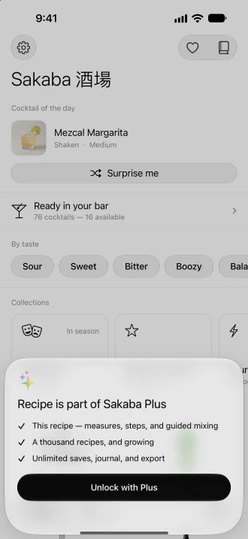
To see only the recipes you can open, tap the filter button in a list and choose Free recipes only. The option appears on lists that contain Plus recipes, and only while you don’t have Plus.
On Home, the row that counts what your bar can make shows two numbers on the free tier: how many cocktails your bottles can make, and how many of those you can open. See What can I make?
When you reach a free limit
Once you have 3 recipes of your own, adding another or using Duplicate & edit opens the Sakaba Plus page, which explains the limit. The same happens with Add entry once your journal has 3 entries. Deleting one of your recipes or entries frees up a spot again.
If Plus ends
If a subscription ends, for example after you cancel or after a refund, Sakaba notices the next time you open it:
- Plus recipes lock again, including any you saved as favorites.
- Your own recipes and journal entries all stay, and you can still open and edit them. Adding new ones counts against the free limits again.
- The accent color goes back to Monochrome and the app icon to Default. If Plus comes back, Sakaba restores both, unless you picked something else in the meantime.
Export & backup,Journal as CSVandImport & restoreshow a Plus badge again.
A Lifetime purchase never ends.
Good to know
- Every device. Plus belongs to your Apple Account, so it works on each iPhone and iPad signed in to it. If it doesn’t show up, see Restore purchases.
- Family Sharing. Plus can be shared with your family group through Family Sharing.
- The free selection can change. Which recipes are free may change between versions of the app.
Questions? Write to sakabaapp@proton.me.